

Every website we build at JAMAK has a contact form, and every one of them used to post to a form service with its own account. One account per client site, one more login, the leads sitting in a dashboard nobody opened, and the notification email in the vendor's design.
This month I replaced that with Jamak Forms: one small service at forms.jamaklab.com that every client site posts to. It stores the lead, emails it to the client in the client's own brand, and retries until it lands. No client signs up for anything, and it added no new monthly bill.
It's a small project. These are the decisions that made it small, written down so I remember why, and in case you're about to build the same thing. The product side, what a client gets, is on the JAMAK post.

The one rule: store first, then send
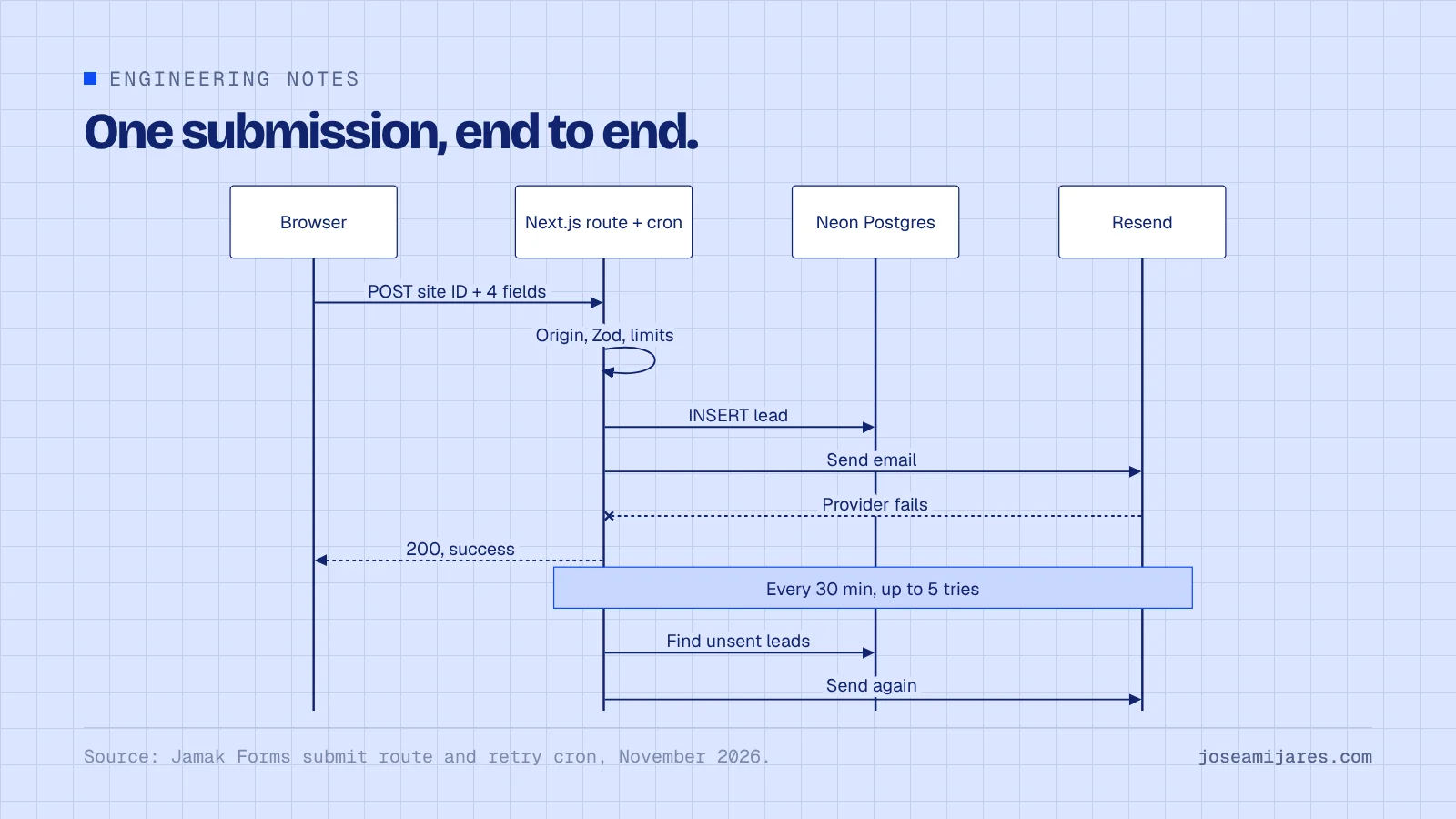
A contact form has one job: don't lose the message. So the submit handler does things in this order:
- Check the origin against the site's registry entry. Unknown site or wrong origin, stop.
- Validate the fields. A filled honeypot field gets a fake success and stores nothing.
- Check the per-IP limit and the site's daily cap.
- Insert the lead into Postgres.
- Only then render the email and send it.
If the send fails, the visitor still sees success, because the lead is stored and a cron job retries it every 30 minutes, up to five attempts with backoff. If the insert fails, the email becomes the only record of that lead, so that path is logged as fatal, not as a warning. And if both fail, the visitor gets the client's direct contact (a WhatsApp number, say) instead of a spinner.
That order sounds obvious. Most form code I've read does it the other way round: send the email, maybe log it, return. The failure you never see is the one where the email provider had a bad minute.
The registry decides, not the request
The browser sends a site ID and four fields: name, email, phone, message. Everything else comes from a typed entry per site in the service's own code: allowed origins, recipients, subject, daily cap, fallback contact and the email's branding (logo, colours, font). The request can't choose where a lead goes.
Two details I like:
- Preview deployments are real tests. A site's Vercel preview URLs match a pattern in its entry. A submission from one is marked as a test and goes to us, not the client, with
[PRUEBA]in the subject. So I can test a client's form on a branch without emailing the doctor. - A wrong site ID fails the build. The React hook I copy into client sites throws at render on an invalid ID, which means
next buildfails on prerender, and a prebuild script checks that the ID exists on the service. A typo can't ship a form that posts into the void.
The stack, and what I didn't use
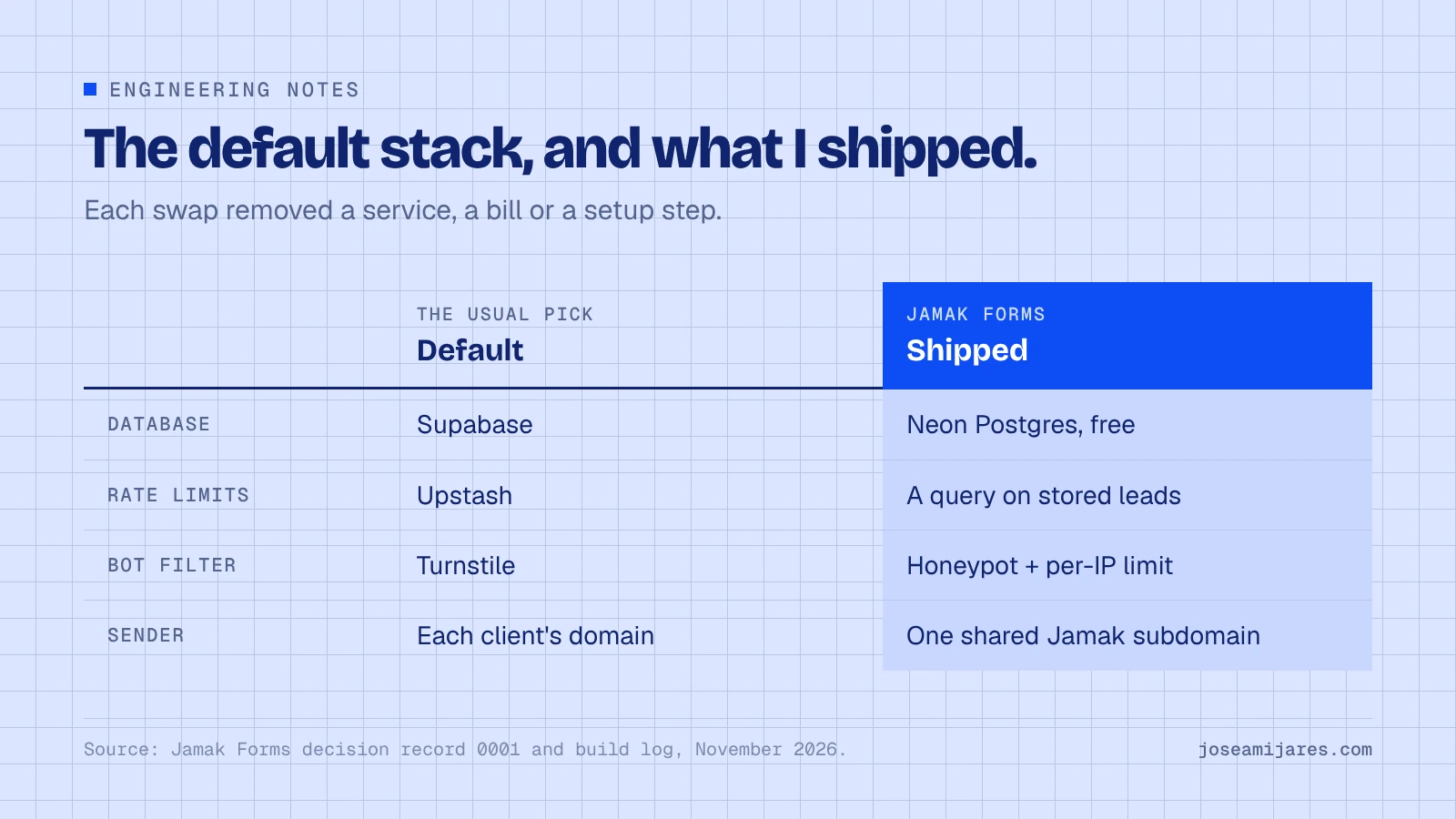
Our Jamak playbook has defaults for this kind of service. I broke four of them, each time to remove a service, a bill or a setup step, and wrote down why in a decision record.
| The usual pick | What I shipped | |
|---|---|---|
| Database | Supabase | Neon Postgres, free tier |
| Rate limits | Upstash Redis | A query on stored leads |
| Bot filter | Cloudflare Turnstile | Honeypot, per-IP limit, daily cap |
| Sender | Each client's own domain | One shared Jamak subdomain |
- Database. My two free Supabase projects were taken, and a Pro project is a monthly cost. Only the server talks to the database, so I don't need Supabase's auth or row-level security.
- Rate limits. Every submission is stored anyway, so per-IP and per-site counts are one
count(*). No extra service, no extra secret. - Bot filter. I planned Turnstile and dropped it before building it, so the visitor sees no challenge. A honeypot won't stop targeted spam, but the daily cap bounds how much gets through.
- Sender. Emails go out from
notify.jamaklab.com, verified once at Jamak. The client never touches DNS, and reply-to is the visitor, so replying still works.
The rest is boring on purpose: Next.js 16 with route handlers only, plain SQL over Neon's serverless driver, Zod for validation, React Email for the template and Resend to send it. Because the SQL is plain, moving to Supabase later is a connection-string change.
The free tier picked my cron schedule
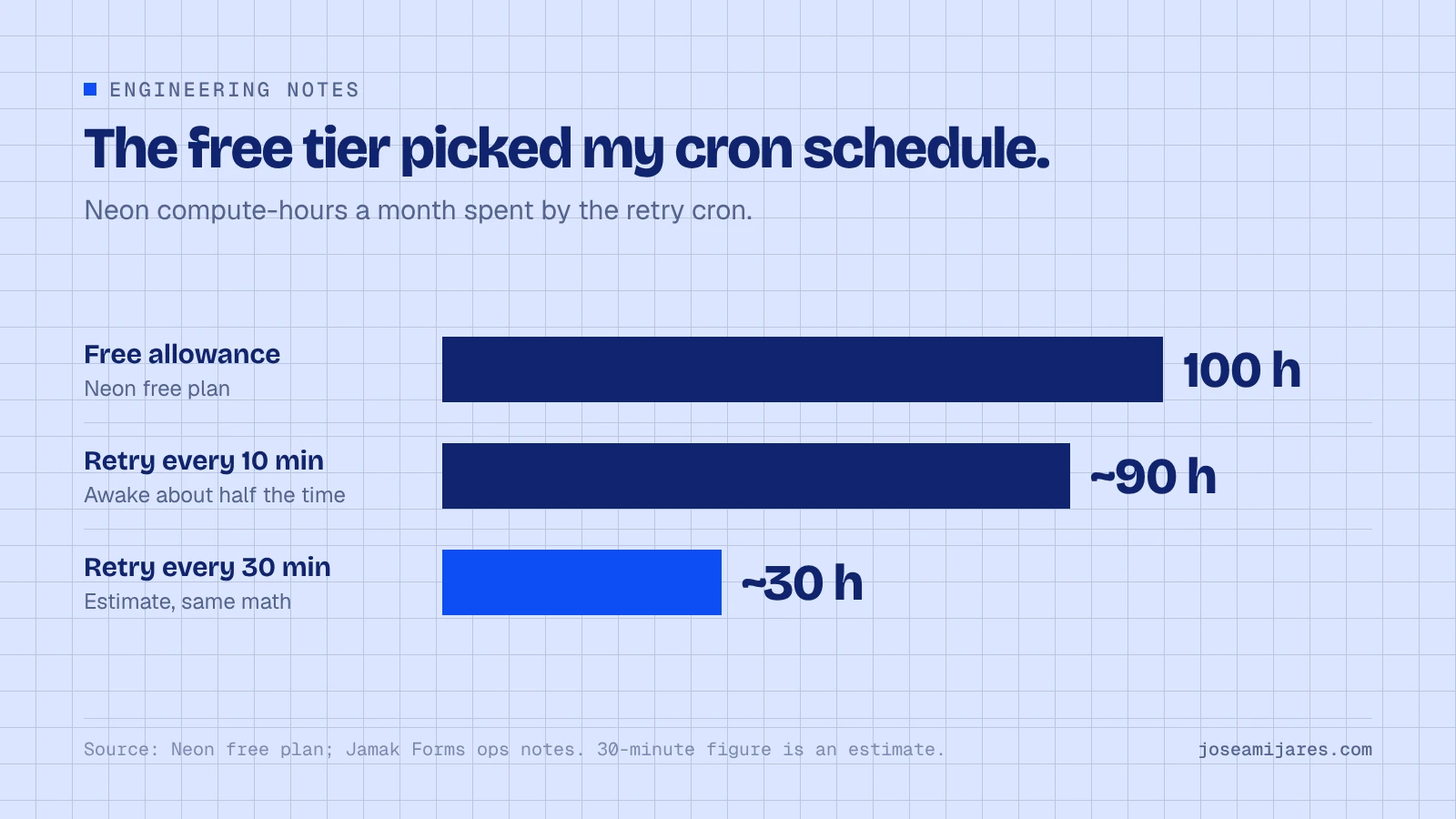
Neon's free plan suspends the database after five idle minutes and includes 100 compute-hours a month. My first retry cron ran every 10 minutes. Each run woke the database, so it stayed awake about half the time, which worked out to roughly 90 compute-hours a month, most of the allowance, spent on retrying nothing.
Every 30 minutes is plenty for a contact form, and the database now sleeps most of the day. I like constraints like this: the bill made me ask how fresh a retry needs to be, and the honest answer was "not very". By the same math the 30-minute schedule should land around 30 compute-hours a month; that one is an estimate, not a reading from the bill yet.
How I know it works
A service that quietly stops delivering is worse than no service, because everyone assumes it works. So it watches itself:

- A daily canary. Every morning a cron posts one test lead through the whole path, to Resend's test inbox, and checks that yesterday's was delivered.
- Delivery events. Resend's webhook reports delivered, bounced, complained and failed per email. A bounce or failure on a real lead raises a Sentry error tagged with the site.
- Errors become tickets. A small webhook turns new Sentry issues into Linear triage issues, linked back to Sentry and deduplicated. No paid integration.
- Quota warnings. Resend's free tier allows 100 emails a day, shared with our CRM, so the daily cron warns at 70.
- A Monday digest. Lead counts per site for 7 and 30 days, and a flag on any site with zero leads in 30 days. A form that went quiet is usually a broken form.
Leads are personal data
Some of our clients are doctors, so I wrote the privacy rules before the code. Message bodies, visitor emails and phone numbers never go to Sentry, analytics or logs. IP addresses are stored only as a salted hash, for rate limiting. After 12 months a daily job redacts the message, the visitor's email and the IP hash; the date, site and delivery status stay so the counts still add up. The admin page shows counts, statuses and a resend button, never message text.
What I left out
No form builder, no file uploads, no client logins, no auto-reply to the visitor, no CRM sync. Each of those is a product. This is a pipe with a guarantee. When a project needs a bigger form, it gets built into that project.
Where it is
The service is live. The first client site, a medical practice, is moving off its form subscription now, and the next sites we build start on it. A plain HTML site needs one attribute and one script tag; a React site gets the hook.
<form data-jamak-site="your-site-id">
  <input name="name" required>
  <input name="email" type="email" required>
  <textarea name="message" required></textarea>
  <button type="submit">Send</button>
</form>
<script src="https://forms.jamaklab.com/v1/form.js" defer></script>
If you build sites for clients, I'd steal the order before anything else: store, then send, then retry. The rest is plumbing. I wrote about the guardrails I put around the coding agents that helped build it in how I contain coding agents.
FAQ
What is Jamak Forms?
A contact-form backend I built for the websites JAMAK makes. Each client site posts its form to forms.jamaklab.com, which stores the lead in Postgres, emails it to the client in the client's brand with the visitor as reply-to, and retries failed sends.
Why not just use a form service like Formspree?
For one site, a form service is fine. Across many client sites it meant one account and eventually one plan per site, leads stored in a dashboard nobody opened, and a notification email in the vendor's design. One shared service removed all three.
What does Jamak Forms run on?
Next.js 16 route handlers on Vercel, Neon Postgres on the free tier, Resend for email, Sentry for errors, and plain SQL. Rate limits are queries on the stored submissions rather than a separate Redis.
How does it avoid losing a lead when email fails?
It stores every lead before sending. A cron retries unsent leads every 30 minutes, up to five times, and a bounce or failure raises an alert. If storing fails, the send path is the only record and is logged as fatal.
How does it handle spam without a captcha?
A hidden honeypot field (bots get a fake success and nothing is stored), a per-IP limit and a daily cap per site. I planned a Cloudflare Turnstile step and dropped it before building it, so visitors never see a challenge. The honeypot won't stop a targeted attack; the daily cap limits how much one can send.
Can I use it for my own site?
Not yet as a public product. It serves the sites JAMAK builds and maintains.